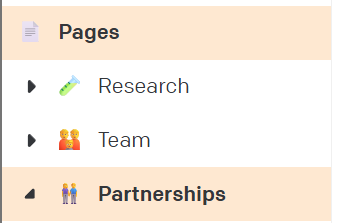
If a menu item in the editor is linked to a set of records, clicking it will show the list of records.
If I now enter a single record to edit it, I cannot click the menu item again to go back to the list. I have to use the Back arrow.
Clicking the menu item, even when it is active (because you are viewing an item within it) should still work to return to the top level (the list).
This issue becomes particularly annoying if you set a second menu item to point to a specific item (using external URL). When using this second menu item, two menu items become active (this is desirable and correct). But I am now locked out of viewing the list.
E.g.: “Partnerships” links to a single record within the Pages model. Clicking “Partnerships” highlights both Partnerships and Pages in the menu (correct and desirable). I am now editing a single record. It is not possible to view all page items by clicking Pages.