Vue Search Widget returning 0 results

I am trying to get site search running in my Nuxt 3 app and having some issues. I followed the example from Vue search widget | Documentation — DatoCMS and it appears the search client is functional, but it is returning 0 results.

I am trying to test this with my staging build at https://staging--everest25.netlify.app/

Thanks for your assistance!

Hi @JLernDesign,

Can you please send us some specific URLs (or screen recordings) where the search is doing this? You can see the crawler logs in the “Build triggers activity” section of your project settings (https://everest.admin.datocms.com/project_settings/deployment_logs/9286613), and there it indexed 129 pages successfully.

So we need to see what’s going on the frontend, but I can’t tell without more details. I don’t think the “domain not whitelisted” error is one of ours… and what is “swan”?

When I visit https://staging--everest25.netlify.app/, I see a logged pageResults[] array, but I don’t see the corresponding network call that should’ve preceded it. I also see some Vue/Nuxt warnings about hydration errors. Is it possible the fetch itself isn’t working as you expected it to?

If you’re able to share any source code with us (or the repo), we can take a look at that in more detail with you. If so, please email us at support@datocms.com with some code snippets and/or share the repo with me at r.tuan@datocms.com (https://github.com/arcataroger).

Thank you!

Also, for troubleshooting, does the search endpoint return the expected results if you make it via curl/Postman/Bruno directly?

@roger Thanks for your help with this! So if I use that example code it does work properly. Can you help me figure out why the code I was using from the Vue composable was not working, but that code does? I’m also just happy I can use this other method if that accomplishes the same thing.

Original Code (not working):

<script setup>
import { useSiteSearch } from "vue-datocms";
import { buildClient } from "@datocms/cma-client-browser";
const runtimeConfig = useRuntimeConfig();
const client = buildClient({ apiToken: runtimeConfig.public.datoCmsToken })

const { state, error, data } = useSiteSearch({
  client,
  query: "benefits",
  buildTriggerId: "36758",
  // optional: by default fuzzy-search is not active
  fuzzySearch: true,
  // optional: you can omit it if you only have one locale, or you want to find results in every locale
  initialState: { locale: "en" },
  // optional: defaults to 8 search results per page
  resultsPerPage: 10,
});
</script>

Updated Code (working):

<script setup>
import { buildClient } from "@datocms/cma-client-browser";
const runtimeConfig = useRuntimeConfig();

async function run() {
  const client = buildClient({ apiToken: runtimeConfig.public.datoCmsToken });

  // iterates over every page of results
  for await (const searchResult of client.searchResults.listPagedIterator({
    filter: { query: "benefits" },
  })) {
    // Check the 'Returned output' tab for the result ☝️
    console.log(searchResult);
  }
}
</script>

I discovered the [swan] console error was coming from a google tag manager script that my client implemented! Sorry about that - totally not related to this issue. I removed from the original question so it’s not confusing for anyone else.

@JLernDesign,

Do you have a reproducible example where we can see the error happening? It’s hard to say what’s not working in your snippets when they are quite different:

  • One console logs and the other just provides state (displayed where?)
  • Your parameters are different between the two

It may be a state management issue, hard to say without the context.

I’ll try to make a minimal example now using the Nuxt boilerplate just to make sure there isn’t an issue with our Vue search component, but if you have a more realistic example, that would probably be better for troubleshooting your particular issue.

This example code works, for example:

<script setup>
import { onMounted, ref } from "vue";
import { buildClient } from "@datocms/cma-client-browser";
import { useSiteSearch } from "vue-datocms";

const runtimeConfig = useRuntimeConfig();
const rawResults = ref(null)

const client = buildClient({
  apiToken: runtimeConfig.public.DATOCMS_API_TOKEN,
});

const { data, state } = useSiteSearch({ client });

onMounted(async () => {
  // Perform the site search lookup
  state.query = "benefits";

  // Use the CMA to do the same lookup
  rawResults.value = await client.searchResults.list({
    filter: { query: "benefits" },
  });
});
</script>

<template>
  <div>
    <h1>Dato Search Test</h1>

    <h2>useSiteSearch</h2>
    <div v-if="data">
      <pre>{{ JSON.stringify(data, null, 2) }}</pre>
    </div>

    <h2>CMA Client</h2>
    <div v-if="rawResults">
      <pre>{{ JSON.stringify(rawResults, null, 2) }}</pre>
    </div>
  </div>
</template>

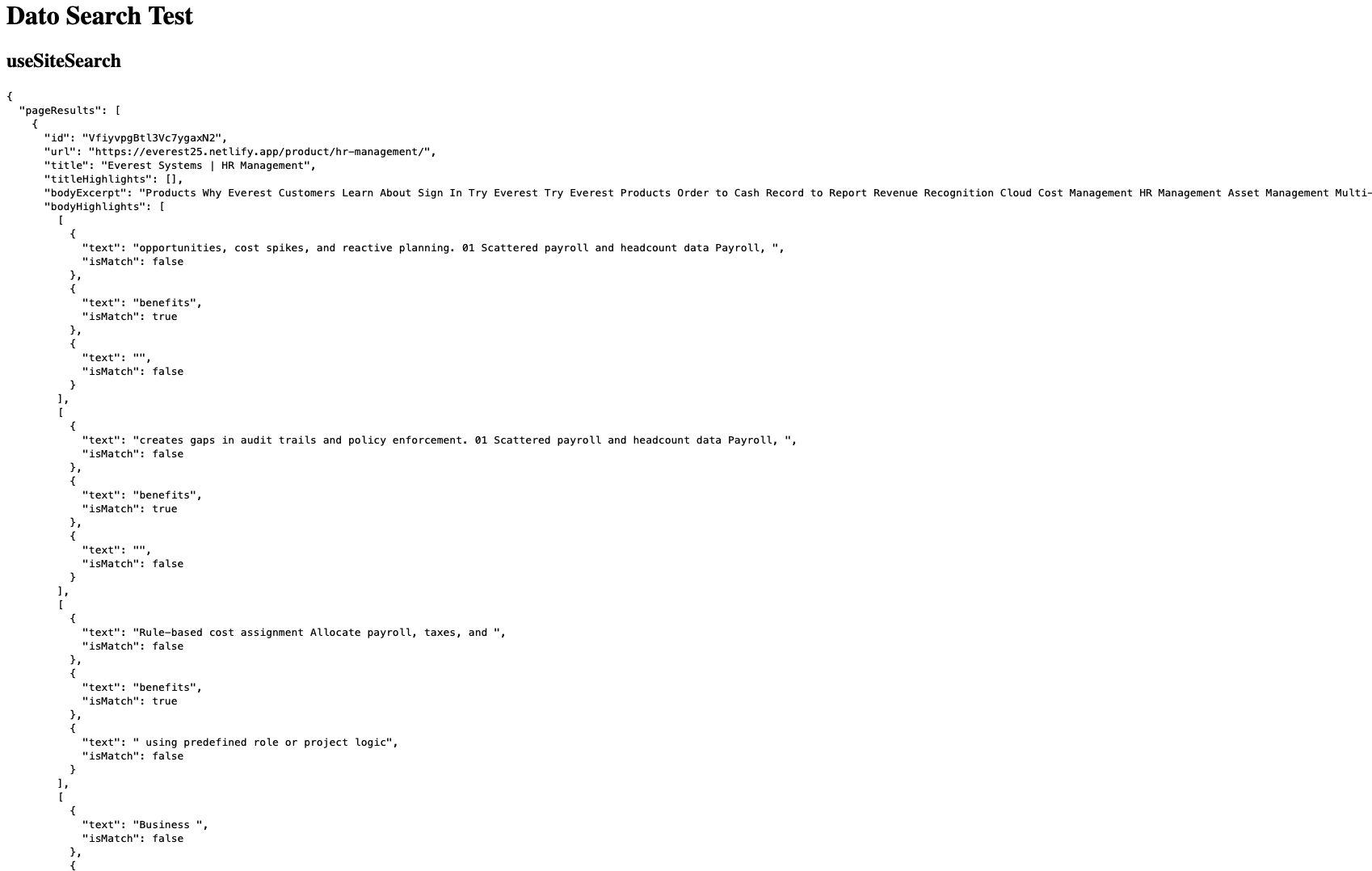
Shows a page like:

(followed by the CMA results at the bottom)

PS there is a more complete example here: https://github.com/datocms/vue-datocms/blob/master/examples/src/SiteSearch/index.vue

The link to the URL on the useSiteSearch readme (https://github.com/datocms/vue-datocms/tree/master/src/composables/useSiteSearch) was wrong. I’ll get that fixed, sorry about that!

Oops, sorry, I just noticed this in your post:

const { state, error, data } = useSiteSearch({
  client,
  query: "benefits", // This is at the top level when it shouldn't be
  // ...
});

The query should be inside an initialState object, like this:

const { state, error, data } = useSiteSearch({ client,
  initialState: {
    query: 'benefits' // Inside initialState
  }
});

This was the key I was missing! I think I expected the composable to return the results without any additional action. So the List method does the actual search and the useSiteSearch declaration is just for initializing. Is there more documentation on this somewhere? Can searches be tested in the CDA Playground? Appreciate the help!

@JLernDesign, I’m sorry for not being clear enough! In my code sample, I showed you how it would work with useSiteSearch and the REST API, one right after the other, and it made it look like they were related when they’re actually two separate things. Sorry about that :sweat_smile:

No, that’s only applicable to the CMA JS client (the REST API). client in this case being the DatoCMS CMA JS client (NOT the CDA one! Site Search has nothing to do with GraphQL).

If you’re using useSiteSearch(), then to initialize the search, you have to do one of two things (neither related to the CMA client at all):

Option 1: Properly set the initial query

const { state, error, data } = useSiteSearch({ client,
  initialState: {
    query: 'benefits' // Inside initialState
  }
});

(In your original code, the problem was that query: 'benefits' wasn’t inside the initialState object)

Option 2: Set the state somewhere else

In my example, that would be this section:

onMounted(async () => {
  // Perform the site search lookup
  state.query = "benefits";
});

In real-world usage, you’d probably tie that state to a text box where the user types in their query.

Yes, in the vue-datocms readme: https://github.com/datocms/vue-datocms/tree/master/src/composables/useSiteSearch

In particular, look at the complete example to see a real-world implementation with a textbox: https://github.com/datocms/vue-datocms/blob/master/examples/src/SiteSearch/index.vue

No, because site searches are the result of crawling your frontend with our web spider, NOT the results from the CMS (CDA or CMA).

To test site searches, you would just make a HTTP call against the site search endpoint: Search result — Content Management API — DatoCMS

You can use the JS client for that (a simple node or browser script), or you can use a HTTP client like Postman or the open-source Bruno.

Separately, if site search isn’t what you wanted and you actually wanted to query and look things up from the CDA directly, you would use our GraphQL filters for that.

Site search is for crawling and indexing the built HTML of your frontend. This means, for example:

  • The crawled results are completely detached from your DatoCMS schema and records.
  • The spider only sees what your visitors see (and sometimes even less, because it can’t execute fancy clientside JS)
  • It’s good enough for simple blog posts, etc., but it’s not a replacement for more featureful search engines like Google or Algolia, etc. There’s also the open-source TypeSense if you need something more powerful and customizable

Overall, it depends on your use case. If you want a simple text box search where your user can type in a basic string and you return a list of matching pages, our basic site search might be good enough.

If you need something more complex, like the ability to break down results by category (blog posts vs product pages, for example), you’d either have to use another search engine, or at least work around the limitations of our search engine and try to categorize the results yourself by URL path or such.

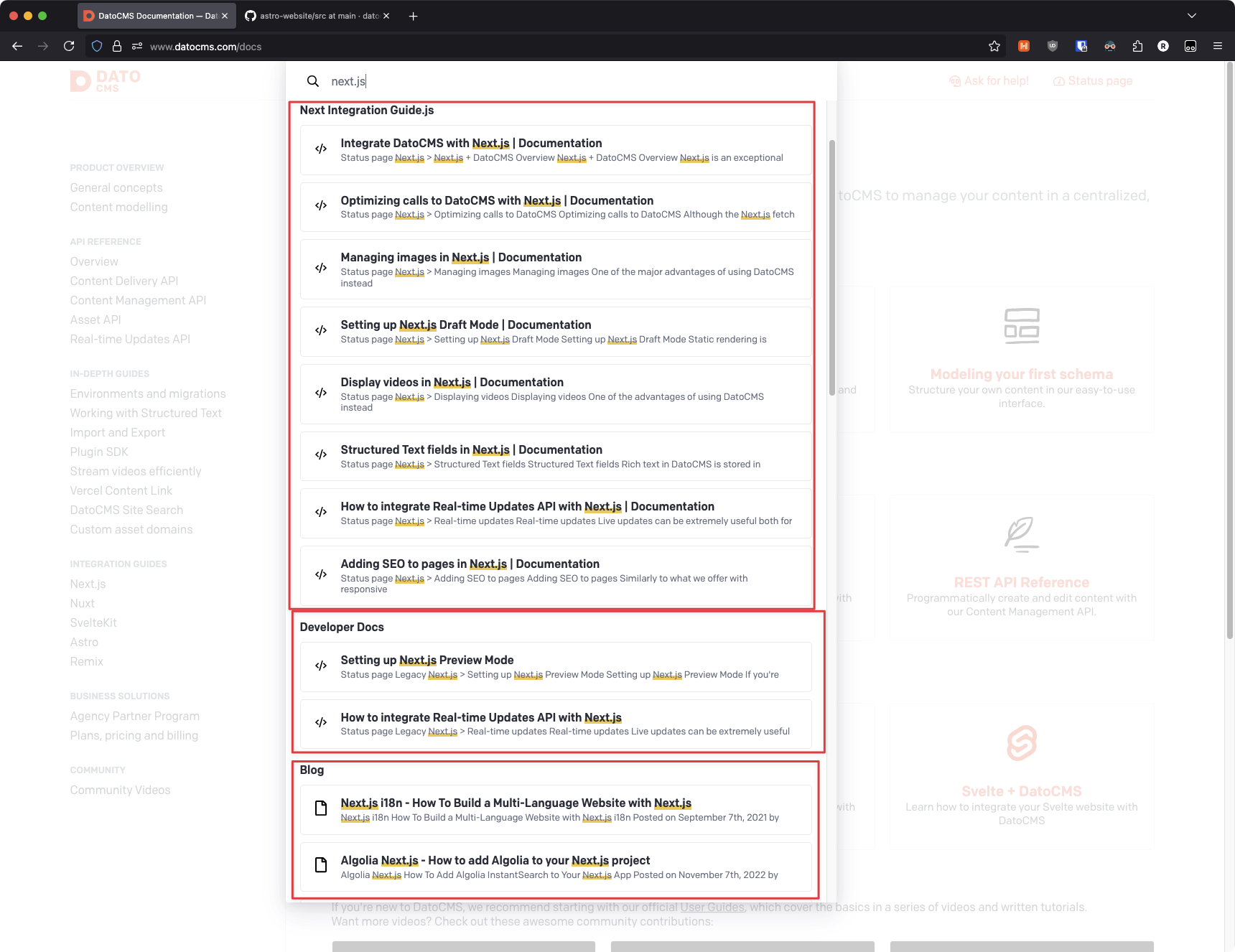
Our own docs site uses this latter, “fake” categorization technique:

Those sections are not inherently part of the search results. We classify them based on URL path matching. Example code (sorry, this is React and not Vue): https://github.com/datocms/astro-website/blob/main/src/layouts/docs/BaseLayout/Search/index.tsx (the Areas[] array and related functions).


Sorry for the long post!

TLDR takeaways:

  • Site search crawls your built frontend and returns uncategorized keyword matches by relevance
  • Site search has nothing to do with the CDA
  • To test site search, you have to make an API call, using either the JS CMA client or a HTTP testing app (Postman, Bruno, cURL, your IDE, etc.)
  • useSiteSearch requires you to provide the query either inside an initialState{} object in init, or by altering the destructured state property of its hook elsewhere (like in a textbox). See the readme and example there for details.