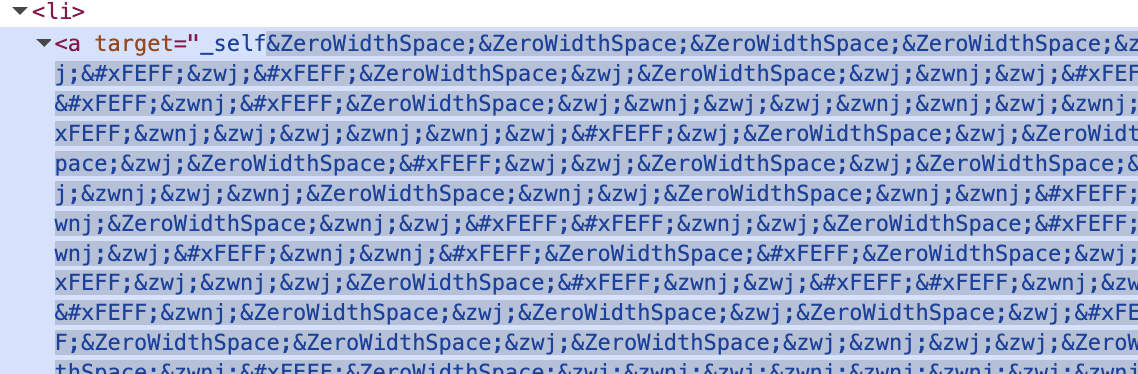
Was trying out visual editing (which is GREAT by the way) and I found an issue still present.
The issue shows when you are using data from DatoCMS to configure class names or components. Since these values will also be tagged with the visual editing hidden characters, they don’t actually match and break the code.
(Similar, this is from a ButtonRecord where the user can configure their button to be used in the page. The configurations are set in a single line text field shown as a dropdown, and then used as configurations on the component)
It would be great to have an “opt-out” option for these kind of scenarios.
If required I can share links for the project in private but not supposed to be publicly available yet so will not share here.
Sorry, I think this one of those situations where seeing the actual problem directly would really help us understand what is happening. Could you please send us the URL to the record in question where this is happening, and also the frontend URL where you see this?
You can privately send it to us at support@datocms.com and just mention this forum post.
What you’re seeing is a side effect of how Content Link works: when stega encoding is enabled (for example via contentLink: 'v1' on your CDA request), DatoCMS appends invisible Unicode characters to text fields so the preview can map what you see on the page back to the exact record and field. They’re invisible in the UI, but they’re still part of the string, so they can definitely break things like CSS class tokens, switch statements, or any equality checks against “clean” strings.
For exactly these “configuration” use cases, the intended fix is to clean the value right before you use it in code with the stripStega() helper from @datocms/content-link. It works on strings, but also on objects and arrays. Internally it JSON serializes the input, removes the stega segments using the stega regex, then parses back to the original shape.
You’d then use cleanTarget or cleanVariant for component selection and comparisons, and cleanClassName for className so your CSS matches again. This stays nicely scoped to preview sessions, since you typically only enable contentLink in draft mode anyway.
If you also want the element to remain editable even though you’re stripping the value for logic, you can keep the original stega string only as the overlay source and use the cleaned value for behavior, for example with data-datocms-content-link-source:
So if you’re ever bamboozled and befuddled by the invisible Unicode ghosts haunting your CSS and frontend components, now you have a way to reveal them!! (And as before, you can always exorcise them with stripStega() where you don’t want them… but now they’re easier to see while debugging)