I’m trying to make sure I’m actually getting a raw MP4 file from Dato, and not a streaming URL.
In the project settings I’ve enabled access to raw videos (the “Block serving URLs for raw video assets” toggle is off).
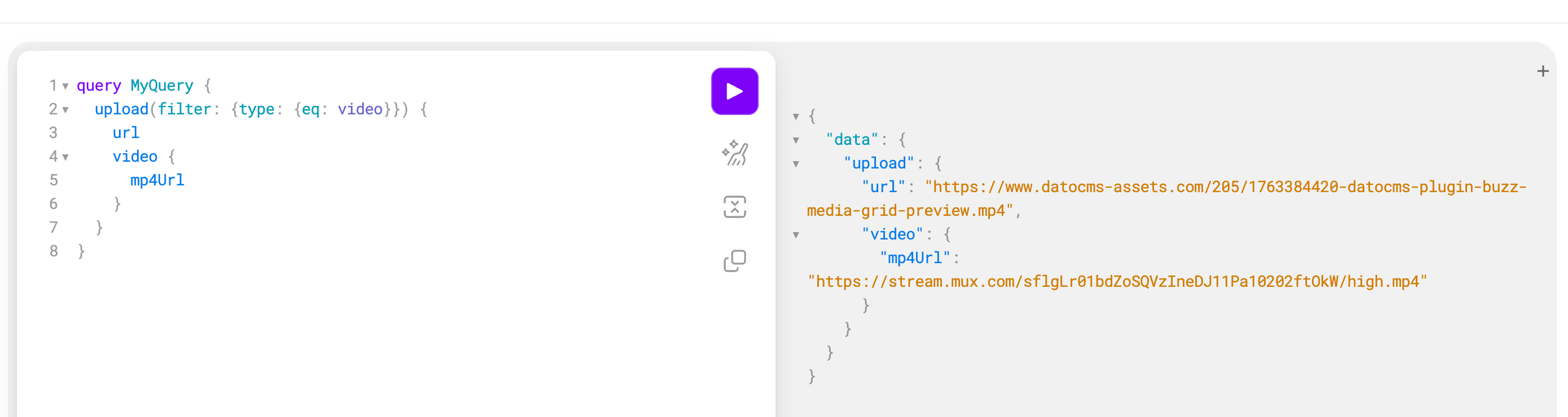
In my GraphQL query, I’m requesting the mp4Url for a video field. I do get an .mp4 URL back, but it still looks like this:
https://stream.mux.com/XXXXXXX/high.mp4
From my understanding, this looks like a Mux URL rather than a “raw” file hosted as a regular Dato asset URL.
What I want to make sure of is that by using this URL (for example https://stream.mux.com/XXXXXXX/high.mp4) directly in my app to preload and play the video, I’m not going to hit any playback quota or limits (e.g. Mux-like streaming quotas). I’m essentially trying to confirm whether this behaves like a normal “file download” from Dato in terms of quotas/billing, or if it’s treated as video streaming with potential limits.
My questions are:
When Block serving URLs for raw video assets is disabled, is the mp4Url returned by GraphQL considered a raw video asset, even if it’s on the stream.mux.com domain?
Is there any way (via the GraphQL API) to get a direct URL to the original uploaded MP4 file (like a normal Dato asset URL), instead of a Mux-based URL?
If not, what is the recommended way to fetch a true file URL suitable for things like preloading videos for WebGL/Three.js (where I’d prefer a plain MP4 file rather than an HLS/streaming setup)?
Specifically regarding quotas/billing: does repeatedly using the https://stream.mux.com/XXXXXXX/high.mp4 URL count against any kind of streaming or bandwidth quota (on Dato’s side or Mux’s), or can it be treated as a regular raw file download with no extra “video streaming” quota?
I’ve already read the docs linked from the “Block serving URLs for raw video assets” setting and the “Learn how we serve video assets” help link, but I’m still not sure if what I’m seeing is expected behavior or if I’m missing another setting somewhere.
Framework and version:
Next.js (App Router)
Using the DatoCMS GraphQL API on the server side to fetch content
To answer your first question, the mp4Url field returned within the video object in your GraphQL query is indeed generated and served by Mux. Even though it is a static MP4 file and not a streaming manifest, Mux treats it as a static rendition of the video asset. This is why you are seeing the https://stream.mux.com domain.
This leads directly to your question about quotas. Because that URL is served by Mux, accessing it counts towards your project’s Video Streaming quota (measured in minutes of video delivered). It is treated the same way as HLS streaming in terms of billing, so repeatedly downloading or playing that high.mp4 URL will consume your streaming minutes.
If you want to download the original MP4 file exactly as you uploaded it and have it count towards your standard Asset Bandwidth quota (measured in GB) instead of Streaming Minutes, you should adjust your GraphQL query. Instead of querying inside the video block for mp4Url, you can query the url field directly at the top level of the asset field.
For example, if your field is named my_video, asking for url will return the direct link to the file hosted on https://www.datocms-assets.com. This URL points to the actual raw file on our storage. Since you have already disabled the “Block serving URLs for raw video assets” setting in your project, this datocms-assets.com URL will be publicly accessible and is likely the best option for your WebGL or Three.js preloading use case.
Just keep in mind that using the url field serves the unoptimized file you originally uploaded, so you will want to be mindful of the file size to manage your bandwidth usage effectively.
I hope this helps clear things up! Let me know if you have any other questions.
@m.finamor already provided a thorough answer above, but I just wanted to add a note: Please be sure to estimate your bandwidth costs before doing this.
On the support side, people accidentally serving raw MP4s is the #1 cause of cost overages we see from customers. Our Pro plan comes with 1 TB/mo, and if you have a 10 MB video, that’s only 100k views before you exceed that limit. Video will chew through your bandwidth allocation very, very quickly.
In your case, I know you’re trying to do this on purpose, but just please be sure to understand how much this will cost upfront so you don’t end up surprised later.
It’s fine if your video is really small (a short animated texture?) and/or it’s a very niche site with not a lot of visitors. But for any sufficient large/long video or sufficiently popular site, it will get very expensive very quickly. That is the reason we leave it off by default, so please only enable it if you are sure the costs will be controllable.
Depending on your use case, you may also want to consider other video providers (like whichever host is hosting your other WebGL/Three.js assets, other CDNs, Cloudflare R2, etc.) and try to estimate costs there.
Just don’t want you to be surprised by a sudden bandwidth overage bill, is all!