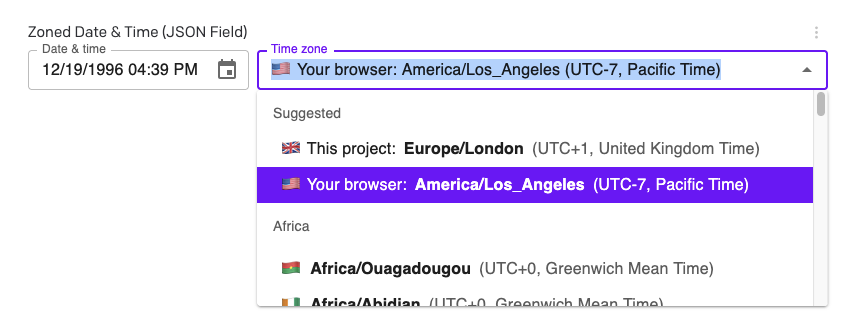
I guess this is a feature request, but if there is a workaround for the weird default behavior other than just using strings, I’m all ears.
I’m sure many companies need to display events in multiple timezones, but the dateTime field does not support this, as it just converts everything to one timezone, and doesn’t save the data for the entered timezone for use in conversion on the frontend.
I’m sure there’s a reason for this default behavior, but I can’t for the life of me figure one out. /rant
Anyway, how can I manage events in multiple timezones without just storing date/time data as strings, with all the issues that brings?
I have some bad news, unfortunately This is actually intentional behavior, a design choice on our part that probably will not be changed soon… I am sorry!
That said, even though it was a deliberate choice, it’s one that makes life quite difficult for some of our customers. I don’t like it either, myself, but there is not currently enough demand to justify the backend changes it would need…
HOWEVER, there is maybe a workaround you can do, as discussed in one of those threads:
So you would store something like 2024-09-08T13:56:11 in the first field, and Europe/Rome in the second field (or combine both in a JSON field). The tricky part is that you’d have to make a custom UI (via our plugins SDK) to make those fields easier to use for your users. But then you’d at least be storing semantic data with their original timezones kept.
I can make you a quick and dirty example plugin for this, if that would help?
Hmm, this is intriguing. Definitely would like to have a plugin for this, but I haven’t got so far as building my own plugins yet. May need to do that. I’ll take whatever you’re willing to send me to get started, though!
That was just a quick and dirty vibecoded example that shows the UI, but the code it made wasn’t great… overengineered and hard to follow. Let me rewrite it for you the old-fashioned, handcrafted way for a cleaner example
It’s a pretty powerful system perfect for adding functionality like this.
But in this case, this is something that’s bugged me for long enough that I’m just going to go ahead and make a functional plugin for you and publish it. Please give me a couple days and then you can both use it directly and see the code if you’d like.
{
  datetime_iso8601: "1996-12-19T16:39:57-08:00", // ISO8601 string
  zone: "America/Los_Angeles", // IANA TZ identifier
  offset: "-08:00", // Offset from UTC, same as ISO8601
  date: "1996-12-19", // ISO date
  time_24hr: "16:39:57", // 24-hour time
  time_12hr: "04:39:57", // 12-hour time
  am_pm: "pm", // AM/PM for 12-hour time
  timestamp_epoch_seconds: "851042397", // Unix epoch timestamp
  zoned_datetime_ixdtf: "1996-12-19T16:39:57-08:00[America/Los_Angeles]", // For future use with Temporal API; see RFC 9557
}
PS I didn’t actually end up hand-coding the thing (too many nuances to deal with), but did leave comments throughout so hopefully it will be a useful learning example too.
Let me know if it works for you, and if you have any questions or comments about the code!
 This is actually intentional behavior, a design choice on our part that probably will not be changed soon… I am sorry!