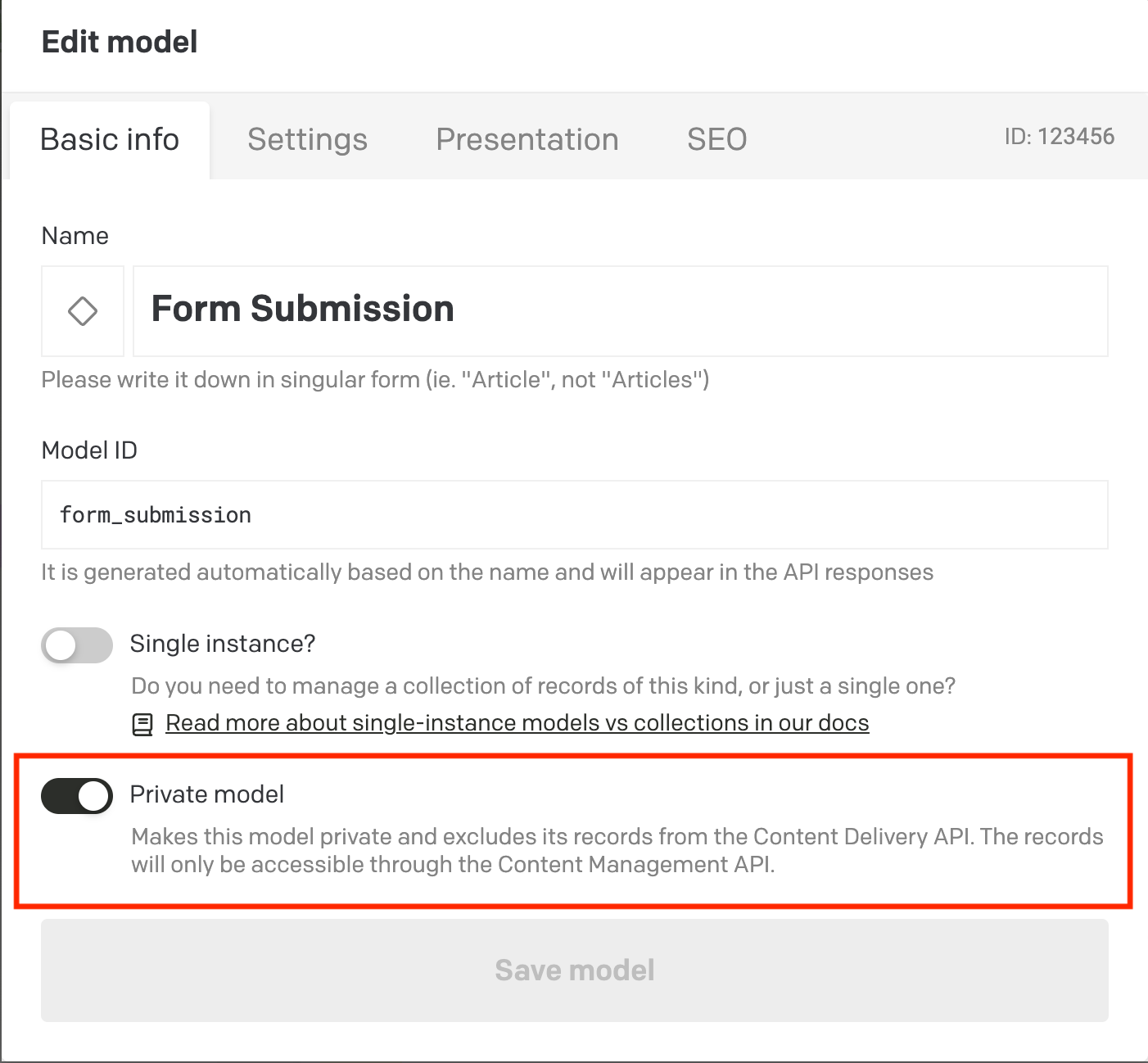
I’m setting up a model in DatoCMS for form submissions. These records should be private, they’re only for internal reference and should never be published or appear on the frontend.
In the admin UI there’s the Publish button for anyone with enough permissions (e.g. Admin). For true safety, I’d love to either:
Have a way to completely remove or disable the Publish button for a specific model, even for Admins
Or use some other built-in mechanism that makes a record permanently “private” without relying solely on roles and API permissions
Is there any better/recommended way to ensure these records can never be published accidentally?
There isn’t a built‑in “never publish this model” toggle. The safest pattern is to combine permissions with API token scoping so even an accidental publish cannot reach your frontend.
Keep the draft/published system on for the submissions model, since only published content can reach the delivery APIs. Unpublished records stay in draft and are not exposed to end users.
Lock publishing down at the role level for that specific model. In Content permissions you can deny the Publish/unpublish action per model. Give your day‑to‑day users a custom role that cannot publish that model, and reserve the default Admin role only for the few who truly need it. Admin has full privileges by definition, so using a custom “almost‑admin” role is the practical way to remove the button for everyone else.
Then remove any chance of exposure on the frontend by scoping your Content Delivery API token. Create a read‑only token that is tied to a role which cannot view the submissions model. With the improved GraphQL security, types you do not grant access to are hidden from the schema and responses, so even if someone clicks Publish the site cannot query those records.
If you want an extra guard in the UI, a tiny project‑wide plugin can block publishing for that model. The Plugin SDK exposes an onBeforeItemsPublish hook; returning false cancels the action, which effectively disables the Publish button in the web app for targeted models. This stops UI mistakes, while permissions and token scoping cover API access.
As a last‑ditch safety net, you can also wire a webhook on publish events for that model to immediately call the CMA and unpublish the record again. It is simple to set up if you want an automated rollback.
Thank you for sharing all the workarounds. I’ve decided to create a custom plugin to prevent publishing for that specific record type, mainly to avoid the risk of an admin accidentally publishing it. I’d also like to create a separate post to submit a feature request for “Private models.” Would that be okay?
You can certainly make a new feature request if you’d like, but it seems a bit redundant? Not only because the roles & permissions already do what you desire (and more safely than a toggle, because otherwise that toggle would itself need to be permission-scoped), but also because the CDA by its nature will only give you what you explicitly ask for anyway.
It seems to me that:
If you don’t want the frontend to see this model, well, it won’t — it only gets what you explicitly query for. Even if an admin forcibly publishes all those records, they won’t just magically appear anywhere unless a dev also adds them to a frontend query AND writes a page template to display its data
If you don’t want a particular developer or API key to be able to even access this model, even explicitly, then that’s what the roles & permissions already do
If you don’t want ANYONE in your project, including admins, to be able to accidentally change the status of this model, does it even need to be in the same project? It can be in an altogether separate DatoCMS project where none of your collaborators or API keys can touch it
Ultimately, a “published” record is just a flag set on the record (status = published). It doesn’t actually “push” that record anywhere unless you have a webhook to do that, and even then, the CDA only returns what you explicitly ask for, so it still wouldn’t show up unless you explicitly alter your query to include it.
A “private model” UI toggle on its own would be kind of misleading and difficult to implement, because it would still need to tie into the roles & permissions system to ensure that you can’t accidentally expose those records in other ways, like via inter-model relationships and reverse lookups. So it would still have to ultimately depend on permissions to ultimately safeguard access… it would be quite difficult to implement a system that allow relationships in the UI and CMA but then somehow prohibits that from showing up in the CDA.
And that UI toggle would itself have to be a permission, otherwise anyone who can edit schema would be able to turn that off.
It also introduces the inverse problem, of a supposedly “private” model still being accessible via the CMA. Some of our customers actually use the CMA instead of GraphQL to fetch their records, and we wouldn’t want to mislead them into thinking that model is truly “private” in that case. Maybe we can call it “CMA only” instead of “Private”…
Sorry, I don’t mean to be argumentative, just trying to illustrate some of the complexity here.
What do you think? Is that reasonable enough, or is there still a nuanced use case or situation here that we’re missing?
Thanks for all the detailed information, it is very helpful since I am still new to the Dato ecosystem. To give you more context, I am using Dato as a mini CRM where form submissions are stored in a model. Each submission also has a “Submission status” field (New, Responded, Spam, etc.), so editors can go in and update those records.
What I am essentially trying to achieve is:
Exclude this model from any current or future API tokens (CDA)
Remove the Publish button since “Save” makes more sense here
Still allow Admins, Editors, or other relevant roles to perform actions on this model
Right now I have worked around it by creating a new CDA token tied to a “ghost role” (a role no users will ever use, its only purpose being to configure token permissions) along with a plugin that blocks the Publish button. It works, but it feels a bit unnatural and relies on either advanced permissions setups that are prone to error or custom plugin.
I completely understand your points and I may be overthinking this and trying to use Dato in ways it was not really intended for, like storing “sensitive” objects that would normally belong in a dedicated database. That said, having a built-in option such as “CMA-only” models would feel like a more natural fit for this kind of use case.
Thank you for explaining, @deven! As a workaround, you might be able to use workflows (if your plan allows it) and/or related records (separating the form submission itself, which remains view-only, from an editable “form status” model that your editors can modify).
But generally, you are right that this isn’t a use case we’re very good at accommodating at the moment. I might argue that it’s not only a matter of the ambiguity of our “publish” wording (since it doesn’t really “publish” anything by itself without a corresponding frontend query), but also other forms/CRM-adjacent features like having “external vs internal” permissions, a built-in forms handler, analytics, subscription/unsubscription, de-duplication, data deletion requests, record limits and pricing considerations, etc. There’s just a lot of functionality in a proper CRM or marketing suite that our CMS doesn’t have, given that our service is mostly designed for use as a data source for webpages and marketing sites and the such, and less as a destination for user-generated data and form submissions.
There’s nothing wrong with trying to use it this way — a few of our customers do exactly that, like you — but it’s not the majority use case for most of our customers, and so it would be a difficult and unlikely pivot for us.
I think many of our customers think of us more like “build your own website schema” and less like “build your own CRM”… though of course there is always some overlap with any of these build-your-own-database-esque-type-things
Anyhow… I will also let our UX designer/researcher know about this threads and see if they have any thoughts.