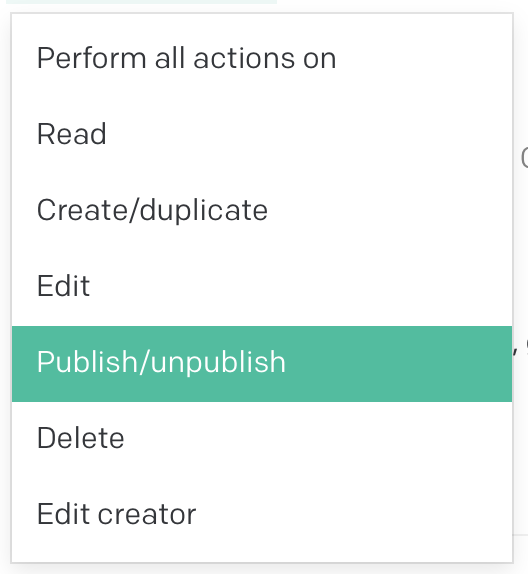
It would be great if there were an option to prevent unpublishing of some singleton models.
Often I use a singleton model to describe a page with fixed layout, and I pull the relevant variable into a static site generator (eg. on my contact.html.erb page I may use dato.contact_page).
I want these pages to use the publishing workflow so that my users can test out changes on staging before deploying to production. But if they unpublish one, the static site generator build will fail (unless I add a load of code to conditionally generate the pages, both per-page and in terms of navigation menu links and cross-page links, which as well as being time consuming and being a big potential source of bugs, doesn’t make sense as these pages are never meant to be unpublished).
It occurred to me that this could also be achieved by making ‘publish’ and ‘unpublish’ separate items in the role permissions section. Though you’d have to add a rule for every singleton you wanted to prevent publishing on.
Another idea, probably much better than the above two: continue allowing users to unpublish singleton models as they please, but have the Dato gem just not throw errors when accessing fields on an unpublished singleton. You could then check a model’s published status and tell your site generator whether or not the page is to be generated.
So I guess this is more of a request for the Ruby library than a Dato request —
It would be great if accessing fields on an unpublished singleton model didn’t throw errors
It would be great if the ItemStatus from the GraphQL API was exposed to the Ruby library to check if an item is published (I couldn’t seem to find status, or published_at, or first_published_at in the Ruby library).
Hi @webworkshop the method contact_page is not created by the client if the page is unpublished, so to prevent your static site generator build to fail in this situation you should use
if dato.contact_page
  create_post "src/contact.md" do
  frontmatter :yaml, {...}
end
To access the record’s status info call the method meta.status, for example dato.home_page.meta.status
Hi is there any update to this? would be nice to have the Publish and Unpublish separate role requirements to prevent non power users from un-publishing a singleton model.
You can solve the “do not allow unpublishing of singleton models”) with a tiny plugin that intercepts unpublish actions and checks the user’s role before letting them proceed. The hook you want is onBeforeItemsUnpublish, which fires any time the UI tries to unpublish one or more records, and you can block the action by returning false. The hook and behavior are documented here: https://www.datocms.com/docs/plugin-sdk/event-hooks#onBeforeItemsUnpublish and on the same page you’ll find ctx.currentRole, which exposes the role of the user triggering the action: https://www.datocms.com/docs/plugin-sdk/event-hooks. Singleton models are easy to detect because the Item Type has attributes.singleton === true, as shown in the CMA docs at https://www.datocms.com/docs/content-management-api/resources/item-type.
Here is a minimal example you can drop into a plugin. It prevents unpublishing if any of the selected records belong to a singleton model, unless the current role is explicitly allowed. You can tune the allowlist logic to match your project.
// src/index.ts
import { connect } from 'datocms-plugin-sdk';

connect({
  async onBeforeItemsUnpublish(items, ctx) {
    // Collect IDs of all singleton models in the project
    const singletonItemTypeIds = new Set(
      Object.values(ctx.itemTypes || {})
        .filter((it) => it?.attributes?.singleton)
        .map((it) => it!.id),
    );

    // Are we trying to unpublish at least one record from a singleton model?
    const touchesSingleton = items.some((item) => {
      const itemTypeId = item?.relationships?.item_type?.data?.id;
      return itemTypeId && singletonItemTypeIds.has(itemTypeId);
    });

    if (!touchesSingleton) return;

    // Simple role-based allowlist. Use role name here for readability,
    // or switch to role IDs if you prefer something immutable.
    const roleName = ctx.currentRole?.attributes?.name || 'Unknown';
    const allowedRoleNames = ['Administrator']; // adjust to your needs

    const isAllowed = allowedRoleNames.includes(roleName);
    if (isAllowed) return;

    // Block the action and inform the editor
    ctx.alert(
      'This record belongs to a singleton model. Unpublishing is not permitted for your role.',
    );
    return false;
  },
});
If you want to make the allowlist configurable by project admins instead of hardcoding role names, you can store an array of allowed role IDs or names in plugin settings and read them from ctx.plugin.attributes.parameters. The config screen docs are here if you want to wire that up: https://www.datocms.com/docs/plugin-sdk/config-screen.
Hey @felixh, the short answer is that plugins cannot block scheduled unpublishing. onBeforeItemsUnpublish only fires for immediate unpublish actions triggered in the UI, while schedules are created in the UI but executed later by the backend, outside of the plugin runtime. You can see the available hooks here: https://www.datocms.com/docs/plugin-sdk/event-hooks.
So, combine the UI plugin you have for immediate actions with a small webhook like the one above to neutralize scheduled unpublishing as soon as it is created. That covers both paths.